


You can help The Sims Wiki by adding it.
Game over
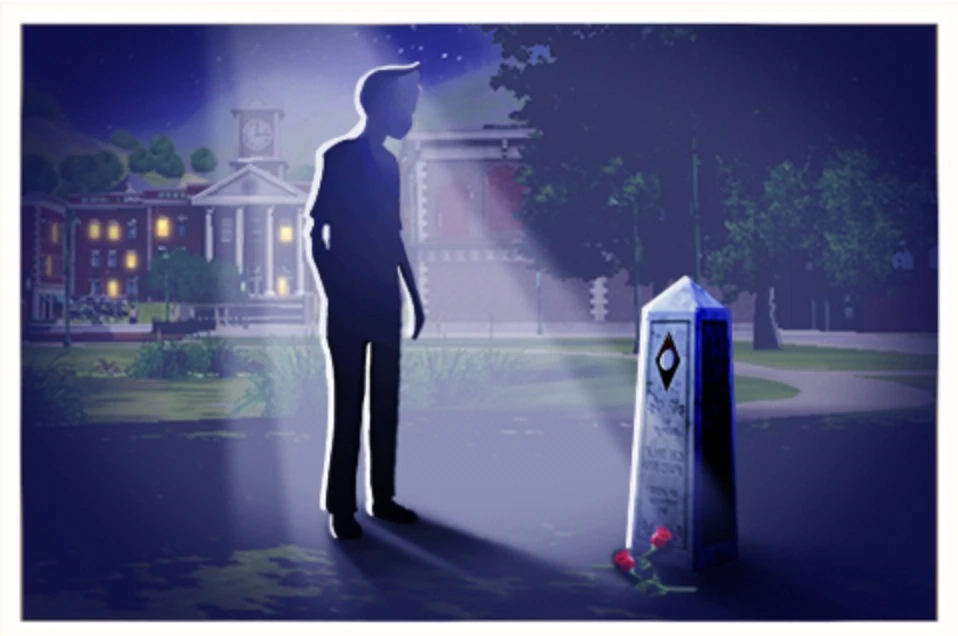
The game over screen when the player's Sim dies in The Sims 3 mobile.
In The Sims series, a game over occurs when there are no more playable Sims in a household. This can be caused by death, or when there are only children and/or pets living after adults or teens die.
The Sims
In the PC version of The Sims, there is no game over screen and the lot remains playable. All modes will continue to be available as long as the player is still on the lot. The player will not be able to return to this state if they save and exit the lot; should they attempt to return, they will either be told that nobody lives on the lot, or if Unleashed is installed, be taken to build and buy mode.
In The Sims for console, if a Sim dies, gets fired, leaves for good after losing a fight, or runs out of money in Get a Life mode due to the action of a Sim (this doesn't occur if all funds are used in Buy or Build Mode), a game over message will appear. Unlike most games, the player will be returned to the main menu afterwards, which results in immediate loss of progress. A game over will also occur if the player refuses to enter the hot tub with the Sim that spawns from the smoke in the Dream House for too long.
The Sims 2
The Sims 2 introduced a game over screen featuring various dialogues of the Grim Reaper known as The Finale. After the last Sim dies, time is paused and the player loses control of live mode. The lot is still playable in build and buy mode, and the remaining funds the household had are still usable.
If all of the older Sims in a household die and only children and younger are left, they will be taken away by the social worker. The player will get a dialog box titled The Orphanage Awaits, and will lose control of live mode once the social worker leaves the lot, and while the social worker takes away the children, build and buy mode are disabled, and the GUI elements for live mode disappear.
When the lot is saved, any Simoleons that the household owned is taken away, yet the game will still require the household to use funds to purchase items until the lot is exited, at which point it can be entered in build mode to build as if it was an unoccupied lot.
The message will appear with the Grim Reaper's icon if all Sims are dead and The Finale message is shown, but if there are children that lived and were taken away resulting in The Orphanage Awaits message to display, the message will not show the Grim Reaper's icon.
If there are pets when all of the older Sims die, an animal control officer will take them away, with a quote from the officer saying "These poor pets no longer have an owner to take care of them. I'm taking them to the neighborhood Pet Adoption Center.". There are no unique messages for this; instead it will be "The Finale" or "The Orphanage Awaits", depending on if there were children in the family when the pets got taken away.
Possible Quotes
The Finale
- Alas, it looks as though the great equalizer has taken its toll, as everyone in this household appears to have died. But there's no reason to allow this now empty house to remain empty! You can move in a new family. That's the way your Sims would have wanted it, don't you think?
- Death. What can really be said about Death? Well, for one, he's a Taurus. He also enjoys long and windy walks on the beach. He describes himself as a horse lover, and prefers a lady on a pale horse to one in an overpriced SUV. But he notes that any interested parties should be gravely serious about starting new relationships, and that bringing along free friends for the other members of the apocalypse would be a preferable first date environment.
- If the point of playing The Sims 2 was to kill off all of your Sims, then you would be the world champion! But, unfortunately, the way things stand now, The Sims 2 is still a LIFE simulator. You could actually exit the lot without saving and maybe try this household again. Or, if you were trying to kill your Sims, and we aren't saying you were, then feel free to move another family into this lot.
The Orphanage Awaits
- Children are really very sturdy folk. Just read any Dicken's novel and the thought of children being taken to an orphanage should really warm your heart. Of course, they'll have to endure the strife and hard knock life at first, but they'll inevitably be adopted by some wealthy benefactor, right?
- Death is always tragic, especially when its direct effects touch one as young as these. However, even more tragic, is the fact that the SimCity Orphan Tax Collection Agency will be placing this estate up for sale in order to cover the cost of orphan care going forward. There go the dreams of growing up and discovering a huge and unknown inheritance for yet another orphan...
- The SimCity Home for Orphaned Youth has really come a long way in the last few decades, so there's no reason to worry about these little ones. Why it was merely 10 years ago that they were serving reconstituted gruel cooked over tire fires, and look at them now! The gruel and the smell of burnt rubber remains strong, but the average managerial wages have risen 30%, and their first initial public offering looks to be strong!
The Sims 3
The Sims 3 has a game over screen known as The End...?. Clicking on the checkmark brings the player to the neighborhood view. If the game over happens due to the death of teen Sims or older and children are left, the Social Worker Coming dialogue appears. If all Sims die away from their home world (such as traveling in a destination world or in university), the player has the option to continue playing the save file in the home world or return to the main menu. The surviving household members, if any, will be left with the "Mourning" moodlet once the player returns to the home world. Otherwise, it is a game over and the player goes to neighborhood view.
Smartphones
In the smartphone version of The Sims 3 (including World Adventures and Ambitions) as the player can only create and play with one Sim, a game over happens when that Sim dies. When a game over happens, an "In Memoriam" dialogue box appears and then shows a scene of a silhouetted Sim looking at the deceased Sim's grave with a light shining down on it. Tapping on the screen will bring the player back to the main menu and any progress from the last save is lost.
Nintendo 3DS entries
Upon the Sim's death, the Sim falls to the ground as in the PC version. But the Grim Reaper does not appear, and the game over screen (if applicable) is shown seconds later. As with the smartphone versions, clicking on the Game Over prompt returns the player to the main menu.
The Sims 4
The Sims 4 gives the player two options after the last Sim in the household dies. The player can save and continue to play with the world, or return to the main menu without saving.
As of Patch 170, when any Sim in the household dies, the player must choose to either keep them in the household as a playable ghost, or remove them from the household by making them a freeroaming ghost. If the last Sim in the household dies and becomes a freeroaming ghost, the Game Over screen will appear.
Gallery


