
| Bright Sprite Holo Disc by Arasika Industries | |
|---|---|
| |
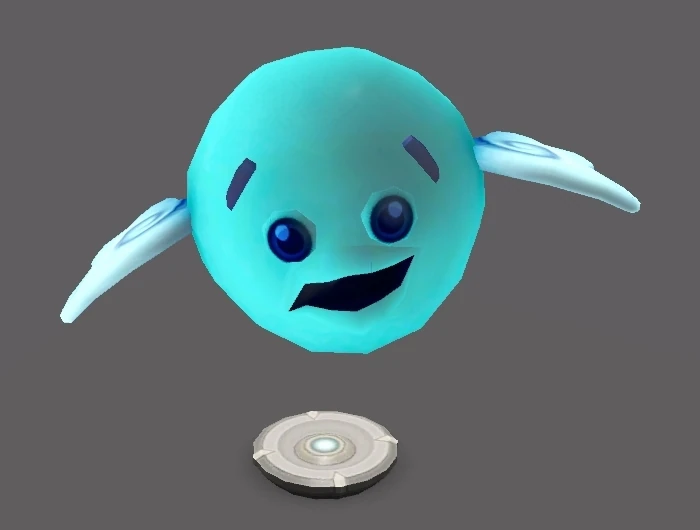
| We all need a friend sometimes; a close and special relationship we don’t have to share with others. Holo Sprites provide warm, instant companionship – but they’ll need tender loving care to keep their mood up! | |
| Game | The Sims 3: Into the Future |
| Buyability | Buy mode |
| Price in game | §300 |
| Object type(s) | Social |
| Skill | |
| Size | 0.5x0.5 |
Bright Sprite Holo Disc by Arasika Industries is a digital pet object introduced in The Sims 3: Into the Future. It can be found under the Entertainment category in buy mode, and upon purchase, a random name is assigned to the Sprite. Functionally, Sprites are very similar to minor pets introduced in Pets. Sprites have a mood, and the mood changes depending on the Sims' interactions with them. However, unlike minor pets, Sprites cannot die, even if they are not cared for.
Interactions
Several interactions become available after a Holo Disc is purchased. These interactions can be performed by interacting with the Holo Disc object that is placed in the inventory or on the lot. Interacting with Sprites increases the advanced technology skill (+500/hr by default) and the social motive.
- Summon
- Clean
- Feed (Requires nanites)
- Talk To
- Rename
- Change Sprite Form
- Check Sprite's Mood
Sprite owners also have access to unique social interactions with other sprite owners. (Or, in the case of Show Off Sprite specifically, any Sim who can be socialized with, regardless)
- Show Off Sprite
- Ask for Sprite Form
- Share Sprite Form
- Sprite Chat
When a Holo Disc is on display, the Sprite will float in place above the disc, with an idle animation and sound loop depending on their mood.
Sprites also have a voice, which sounds squeaky and infantile with a robotic-sounding filter. Usually, when they are happy, their vocalizations sound like cooing and laughter. When their mood is low, they sob and whimper softly instead.
Sprite Forms
Sprites have skins that are called forms, and these forms can be changed at any time. Upon initial purchase, a Sim with no advanced technology skill will have access to a single random sprite form that has no special requirements. However, more can be unlocked by asking other Sims for their sprite forms, increasing advanced technology skill, and being employed in a career in Oasis Landing.
Sims can bypass the requirements to unlock a sprite form by asking another Sim to share their sprite form. The Sim in question has to have that specific form equipped and must accept the sharing request.
| Image | Name | Unlock method |
|---|---|---|
|
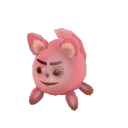
Feronix | One of the default forms that is randomly unlocked upon purchase. |
|
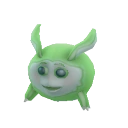
Gamma | One of the default forms that is randomly unlocked upon purchase. |
|
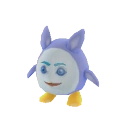
Jenum | One of the default forms that is randomly unlocked upon purchase. |
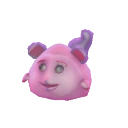
|
Metaso | One of the default forms that is randomly unlocked upon purchase. |
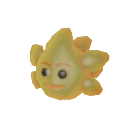
|
Phobus | One of the default forms that is randomly unlocked upon purchase. |
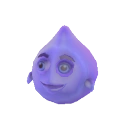
|
Pixon | One of the default forms that is randomly unlocked upon purchase. |
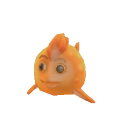
|
Simulus | One of the default forms that is randomly unlocked upon purchase. |
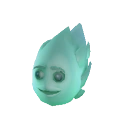
|
Astrid | Reaching level 5 in astronomer career. |
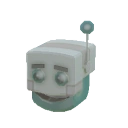
|
Roboid | Reaching level 5 in bot arena career. |
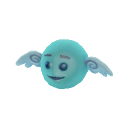
|
Futech | Reaching level 3 in advanced technology skill. |
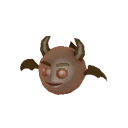
|
Zigrid | Reaching level 5 in advanced technology skill. |
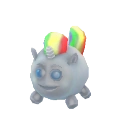
|
Chromec | Reaching level 7 in advanced technology skill. |
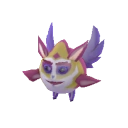
|
Esper | Advanced technology skill challenge. |
Gallery


Trivia
- The Dream Pod's Advanced Technology dream references this item in the Influence Dream option "Throw Holo Disc like a Frisbee".
- As shown in the Check Sprite's Mood interaction, Sprites can convey thoughts and feelings to Sims, at least to the extent of alerting Sims to their current wants and needs. In the Sprite Chat interaction, they can also be seen conveying them to other Sprites as well.
- Jenum is used as the Sprite form depicted in moodlets where Sprites are specifically involved. In the moodlet for Sprite Chat, the Jenum is shown talking to one in the Feronix form.
- Except for Esper, Sprite forms seem to have their designs inspired by either creatures of other species or physical objects.
- Feronix has a clear fox-like appearance.
- Gamma is likely based on a rabbit or other lagomorph, with long ears and a small bun tail.
- Jenum's resemblance is not exactly clear, though it vaguely points to that of a penguin in terms of shape and color scheme distribution; though, it lacks a beak.
- Metaso looks like a kind of rodent, likely a mouse. It could be said that they resemble a computer mouse, too.
- Phobus has a star-like silhouette, though they also resemble a kind of fish. Their back has a spiky texture, like a hedgehog or porcupine, though it could be a trail if they were to be interpreted as a star.
- Pixon has a liquid-droplet shape, though also having limbs.
- Simulus has typical attributes of fish, like having fins for limbs and a scaly orange body. More specifically, it looks like a goldfish.
- Astrid and Roboid resemble an asteroid and Plumbot, respectively, as confirmed by their namesakes and unlock methods.
- Futech and Zigrid are visual counterparts of each other, with a clear angel and devil motif, respectively.
- Chromec resembles a unicorn with a rainbow-striped mane and tail.
- Feronix and Esper are the only two Sprite forms that have pronounced noses. While Feronix, Gamma, Jenum, Metaso, Chromec, and Esper have visible ears, Phobus, Pixon, Simulus, Roboid, Astrid, Futech, and Zigrid do not.
- The animation of the Sprites blinking is on a static loop, even while the game is lagging.
Other languages
| Language | Object name | Translated etymology |
|---|---|---|
| English | Bright Sprite Holo Disc by Arasika Industries | |
| Brazilian Portuguese | ||
| Chinese (Simplified) | ||
| Chinese (Traditional) | ||
| Czech | ||
| Danish | ||
| Dutch | ||
| European Portuguese | Disco Holográfico Sprite Brilhante da Indústrias Arasika | |
| Finnish | ||
| French | ||
| German | ||
| Greek | ||
| Hungarian | ||
| Italian | ||
| Japanese | ||
| Korean | ||
| Norwegian | HoloKompis fra Arasika | HoloBuddy from Arasika |
| Polish | ||
| Russian | ||
| Spanish | ||
| Swedish | ||
| Thai |