


Reason: Especially the "Recovery" and "Disabled games" sections should be changed to reflect post-Generations EPs and Store worlds.
Please improve this article if you can.
Load game errors are errors which can occur in The Sims 3 and The Sims Medieval. It can also happen on other games of The Sims.
Cause
This occurs if The Sims 3 and The Sims Medieval is unable to load the saved game or a town. There are several possible causes:
- The savefile is corrupted.
- One of the game's .world files (for example "Sunset Valley.world") are corrupted.
- The savefile's length is too long (The example in the image below had 186 characters).
- Under normal circumstances, "Save As..." only allows up to 23 characters in its textbox as of Patch 67, making the length glitch unable to occur except by manually editing the savefile's folder(s) in a file explorer.
- If the savefile has a long name but manages to load, it can be played but an error code (nominally Error 6 or 8) may occur if you try to save. This cannot be done in The Sims Medieval as the game will freeze at the Main Menu.
- Corrupted or otherwise broken custom content that massively prolongs the loading time.
- Trying to get around Error 12 by going to a sub-world and then try to get back to (and load) the standard world.
In fullscreen, there is a black background with the message. This background is gray in windowed mode. When this occurs, the message is displayed upon loading the game.
"A serious error has occurred while loading 'town'. It is strongly recommended that you restart the application"
Note: Town refers to the game The Sims 3 and The Sims Medieval is trying to load such as Sunset Valley.sims3 and Kingdom.tsm
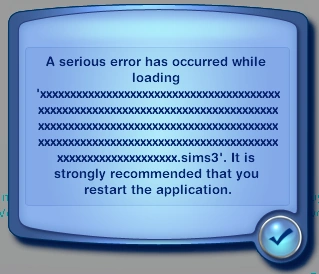

A load game error in The Sims 3 Outdoor Living. This was caused by having too many characters in the file name.
Moving a file that has a town in the filename (Which is stored in savedgame.sims3 or savedgame.tsm) such as Sunset Valley will also cause a load game error.[confirmation needed]
Recovery
It is possible to recover from this. Microsoft Windows and Mac OS X has a backup feature and if the current file is corrupted, the last save file (.sims3.backup & .tsm.backup) can be used by deleting the broken ".sims3" file and then removing the ".backup" suffix from the backup file.
Another way to recover this is to use a backup file that the user has copied and use that backup to load the game.
For .world files, it is suggested to reinstall The Sims 3 games[TS3][TS3A][TS3LN] or reinstall Riverview, Barnacle Bay, or any town made in Create a World.
Screenshots


In other games
In The Sims, The Sims 2 and The Sims Stories, a load game error can also cause the game to crash.
On consoles, load game errors will occur if any of the following are true:
- There is no save file.
- The file is corrupted.
- No memory card is inserted (PS2, GameCube, PSP).
- Card is not recognized by the game and/or system (PS2, GameCube, PSP).
- File is stored on a Memory Stick but the system does not recognize it (Presumably PSP; usually, this is caused by using a different file system such as NTFS[confirmation needed]).
- SD card is set to read-only on the card's physical toggle (3DS and 2DS; the system has multiple failsafes to prevent this from happening while playing cartridge games; ,̀-New-,́ 3DS and 2DS models are not affected since they use microSD slots).
The Sims 4
Disabled games
Sometimes a game will be disabled and there will be an error but a message will not appear when the player tries to load it and the button will be grayed out. This is usually caused if the town does not exist in The Sims 3 as the game was saved in that EP such as Twinbrook and Bridgeport. For example, Twinbrook does not exist in High-End Loft/Design & High-Tech, so trying to load a game that was saved in said world will cause it to be disabled while playing that Stuff Pack as well as later games[1] without Ambitions installed. This is also a similar case if the player tries to load a game saved in Bridgeport without Late Night or Shang Simla, Champs Les Sims, or Al Simhara without World Adventures.
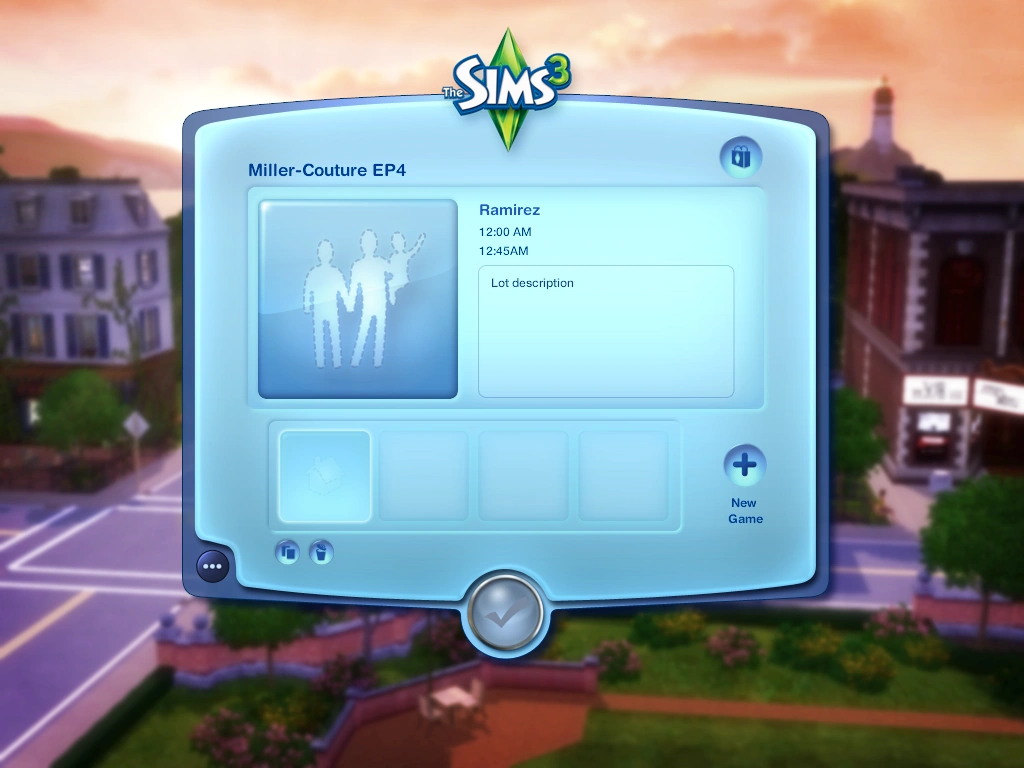

A save game that is glitched. The family's name is Ramirez, the time is 12:00 AM and date at 12:45AM. This game is corrupted and unreadable.
Sometimes if a game is corrupted, this will also occur. The save is abnormal as the date reads 12:45AM instead of the date and the time as 12:00 AM regardless of the time the game was saved at. The household name would be Ramirez (The name "Ramirez" is unknown) instead of the original family name (i.e. if the Goth family was the player's household, it would display Ramirez instead of Goth) and the household description as "Lot description" instead of the family description. It would display that it cannot load the game and content does not exist even if that game was saved in the same version such as Generations.
See also
Notes
- ↑ If The Sims 3 Deluxe is installed, games saved in Twinbrook can saved.