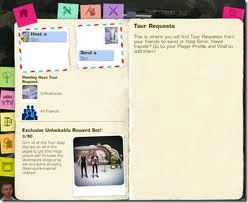

SimPort is a feature in The Sims 3 which was introduced with The Sims 3: Showtime. This feature allows players to send their Singer, Acrobat, or Magician Sims "on tour" to perform at venues in their friends' games. Players can also host a tour for their friends' performing Sims in their own game.
Players without Showtime cannot use SimPort. Players must also have at least two Sims in the household in order to send a Sim on tour, and a performing Sim must be at the appropriate level to participate at the venue in which they are performing. Performing Sims must be at least level two in their profession in order to use SimPort.
All SimPort features require internet access and an account at TheSims3.com to be connected to a player's game.
Sending or Hosting a Sim on tour
To host or send a Sim for tour, the player must open the SimPort interface either through the options menu or selecting the interaction on a telephone or computer. Players can host other Sims by clicking any of the squares in a selected venue's tour stop tab, by selecting an available square from the profession's tour stop tab. The player then must then select a Sim to send, or the venue type if hosting, along with a a tour stop and the online friend they want to whom the request will be made. The home page also displays any tour requests the players has received from online friends. A maximum of four requests will be active at one time, and each request may be accepted or declined.
When a Sim is sent on tour, they leave the world in either a taxi or limo and appear greyed out in the household panel for 12 hours. After this period, the household immediately receives a receives a payment for the performance. Once another player accepts a tour request, the sending player receives a report describing how well the performance went. There is also a chance that the Sim will receive some of the objects thrown at them during the performance.
The receiving player does not need to be online when the request is sent, and the sending play does not need to be online when the request is accepted. SimPort requests remain active for 24 hours or until they are accepted. A player may only have a total of four active SimPort requests at a time.
Completing or accepting a tour awards a stamp, which shows other players online that a player has successfully completed a SimPort concert. Each performance profession has 15 tour stops, while each venue has nine hosting tour stops, resulting in a total of 90 available stamps. Stamp progress is shared across all saves on the same installation.
Earning stamps unlocks additional content, including outfits and stage props. Sending Sims on tour also grants more profession experience than performing locally. Hosting another player's Sim additionally awards more simoleons to the active household.
Players only receive notifications for SimPorts when launching the game or when a new request is available. Otherwise, requests are only visible through the SimPort interface.
Notes
- SimPort progress is stored locally on the computer's hard drive, in a file titled "PassportData.package", located in a numerically titled subfolder within the Downloads folder. Backing up this file periodically can help preserve stamp progress if game data becomes corrupted.
- Some mods that recover missing Sims (such as NRAAS Overwatch) may interfere with Sims currently on tour. If a Sim is recovered while on tour, the Sim may return possessing two cell phones. This can be avoided by disabling these mods while Sims are on a SimPort tour.
Special unlockable objects
Certain stage prop objects, adult outfits, and visual themes are normally only unlockable through SimPort tours, although they are fully present within Showtime's game files. A mod exists to enable these objects Buy Mode and CAS without using SimPort tours.
The objects' themes include oceans, graffiti, steampunk, and candy.
Objects include:
- 4 couches.
- 7 designated armchairs (though only 3 of them have arm supports).
- 2 coffeetable (One of which is a fake hay stack).
- 2 end tables.
- A dresser.
- 64 sculptures, among them, but certainly not limited to:
Notes
- There was initially a glitch where SimPort allowed unwanted custom content to be transferred to the host's game. This has been confirmed as fixed.
- It is possible to have a Sim from SimPort move in with the active household if the player gets their relationships high enough. However, this can lead to a glitch where the player won't get the reward anymore.